Healthcare · AI · 2025
ChartNDrive
An AI-powered clinical assistant that analyzes patient reports and generates automated consultation summaries through voice commands.
- Next.js
- Python
- OpenAI
- Whisper
- PostgreSQL
- AWS
- less time on clinical documentation
- 50%
- less time on clinical documentation
Overview
ChartNDrive is an AI clinical assistant that changes how physicians work with patient data. It combines Natural Language Processing (NLP) with Voice AI so doctors can query complex medical reports and produce clinical documentation without touching a keyboard. The goal is simple: turn raw medical data into usable clinical insight, and take the administrative load off the people who should be spending their time with patients.
We designed and built the product end to end: a voice-first assistant that reads uploaded patient reports, listens to consultations, and drafts structured medical notes, plus the doctor dashboard where every AI-generated note is reviewed before it is finalized.
The challenge
Physicians spend a large share of their day on documentation. They read lab reports, write up consultations and copy details between systems. Every minute of that comes out of patient care, and every manual copy is a chance to introduce an error.
Automating this work is harder than it looks:
- Medical language is specialized. General-purpose speech recognition stumbles on drug names, dosages and clinical shorthand, so the voice layer had to handle medical terminology.
- Clinical settings are hands-busy. A doctor examining a patient can't stop to type or click through menus. The assistant had to work by voice from start to finish.
- Trust is not optional. An AI that summarizes a consultation or reads a lab trend is only useful if the doctor can check where each statement came from. Nothing could go into a patient record without a clinician approving it.
Goals
- Cut the time physicians spend on clinical documentation.
- Let doctors ask questions of uploaded patient reports by voice and get answers they can verify.
- Turn recorded consultations into structured reports covering symptoms, diagnosis and treatment plan.
- Reduce manual data-entry errors by extracting information directly from lab results and recordings.
- Keep the physician in control, with a clear review-and-approve step for every AI-generated note.
Our approach
We designed ChartNDrive around voice first, review always. Voice is the main way into every major action: asking about labs, starting a recording, dictating an order. The screen is where the doctor reviews and confirms. This split matches a real clinic day. During the visit, the doctor talks. Between visits, the doctor reviews.
The second principle was grounded answers. When the assistant answers a question about a patient's history, it does so from the reports that have actually been uploaded, and the interface shows which sources it used. Generated notes keep links back to the moments in the recording they came from. That makes the AI's work auditable rather than opaque.
Finally, we organized the product around the doctor's day, not around data types: everything starts from today's patient queue.
What we built
Doctor dashboard
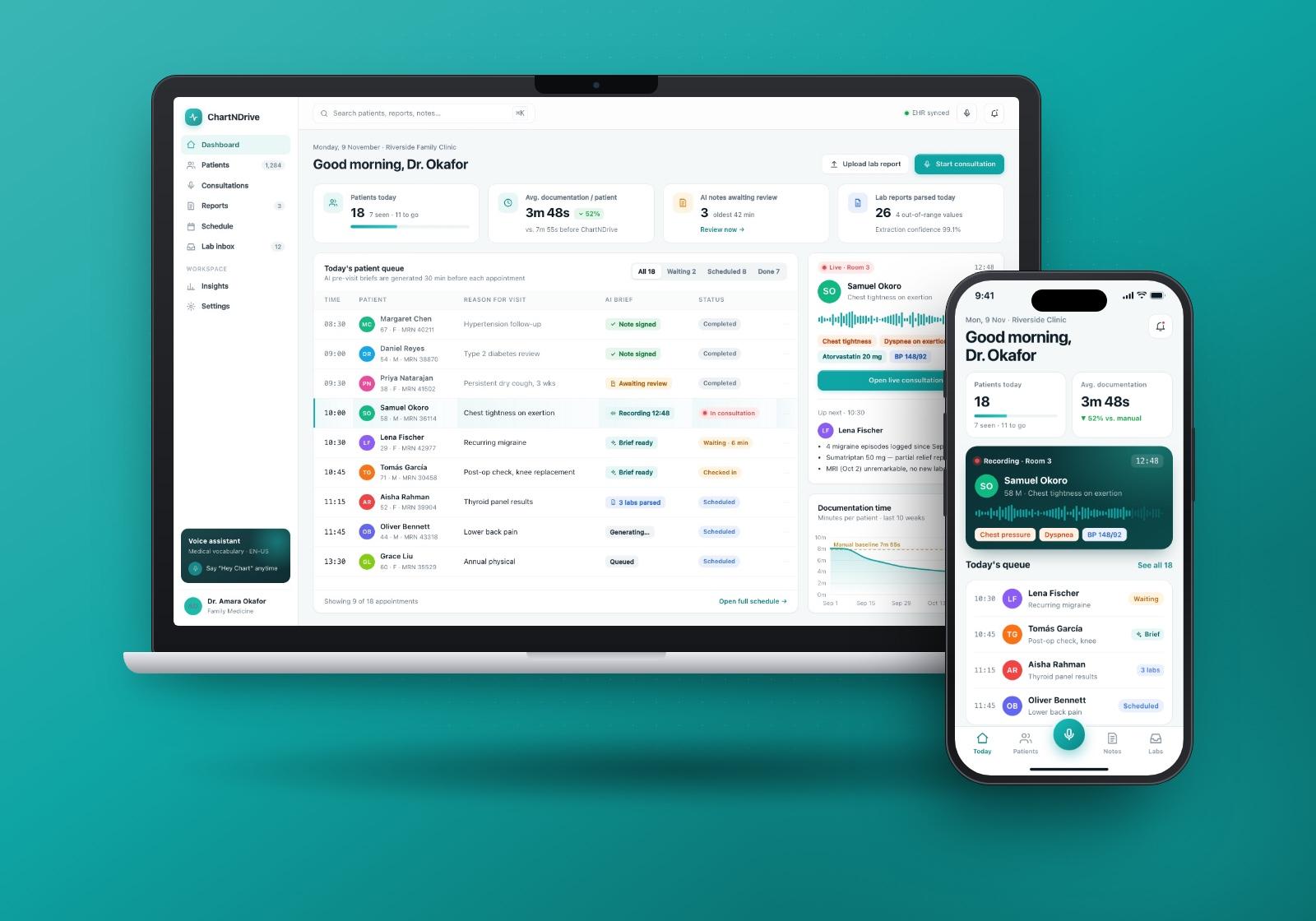
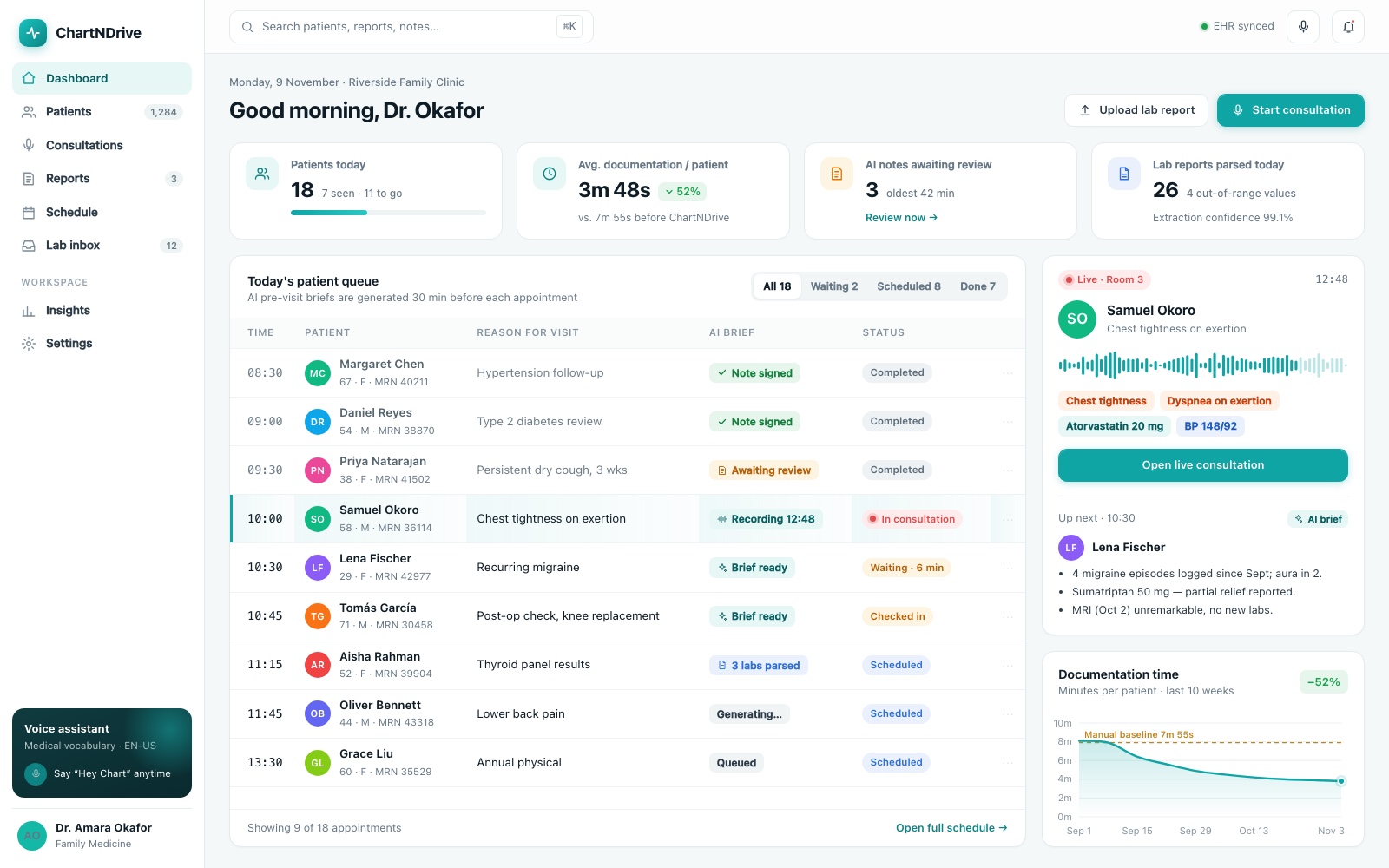
The dashboard is the physician's home base. It shows today's patient queue with appointment status and the state of each AI-prepared brief, alongside quick stats and the notes waiting for review. A live panel follows the consultation in progress, and the next patient's summary is ready before they walk in.
- Patient queue with appointment times, reasons for visit and status
- Notes awaiting review surfaced directly, so nothing gets finalized by accident
- Quick access to start a consultation or upload a lab report
Patient record and AI report analysis
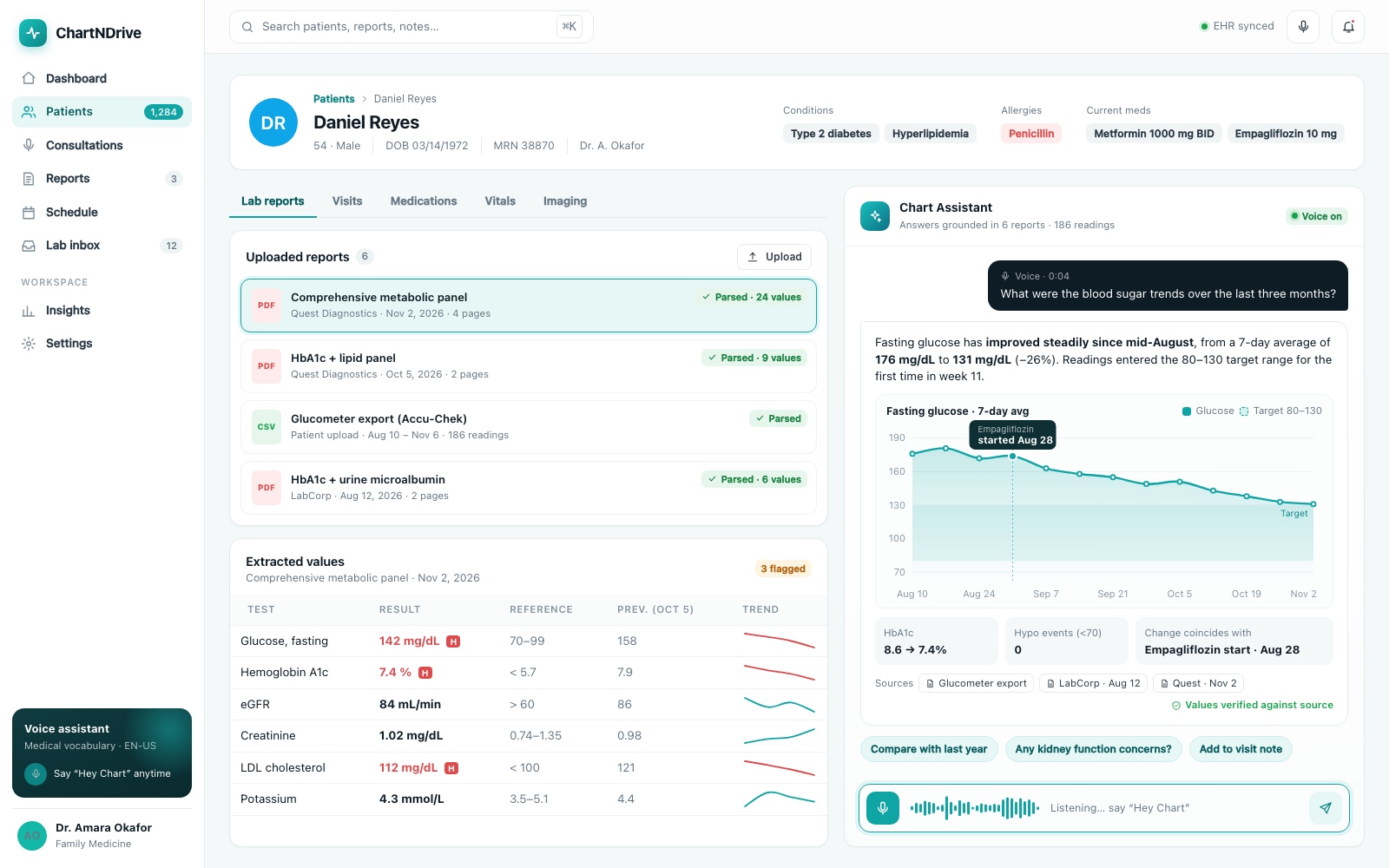
Doctors upload patient reports and the assistant parses them into structured values, flagging results that fall outside reference ranges. Next to the record sits the Chart Assistant. A doctor can ask, out loud, "What were the blood sugar trends over the last three months?" and get back a plain-language answer with a chart and the source documents it was drawn from.
Ambient consultation recording
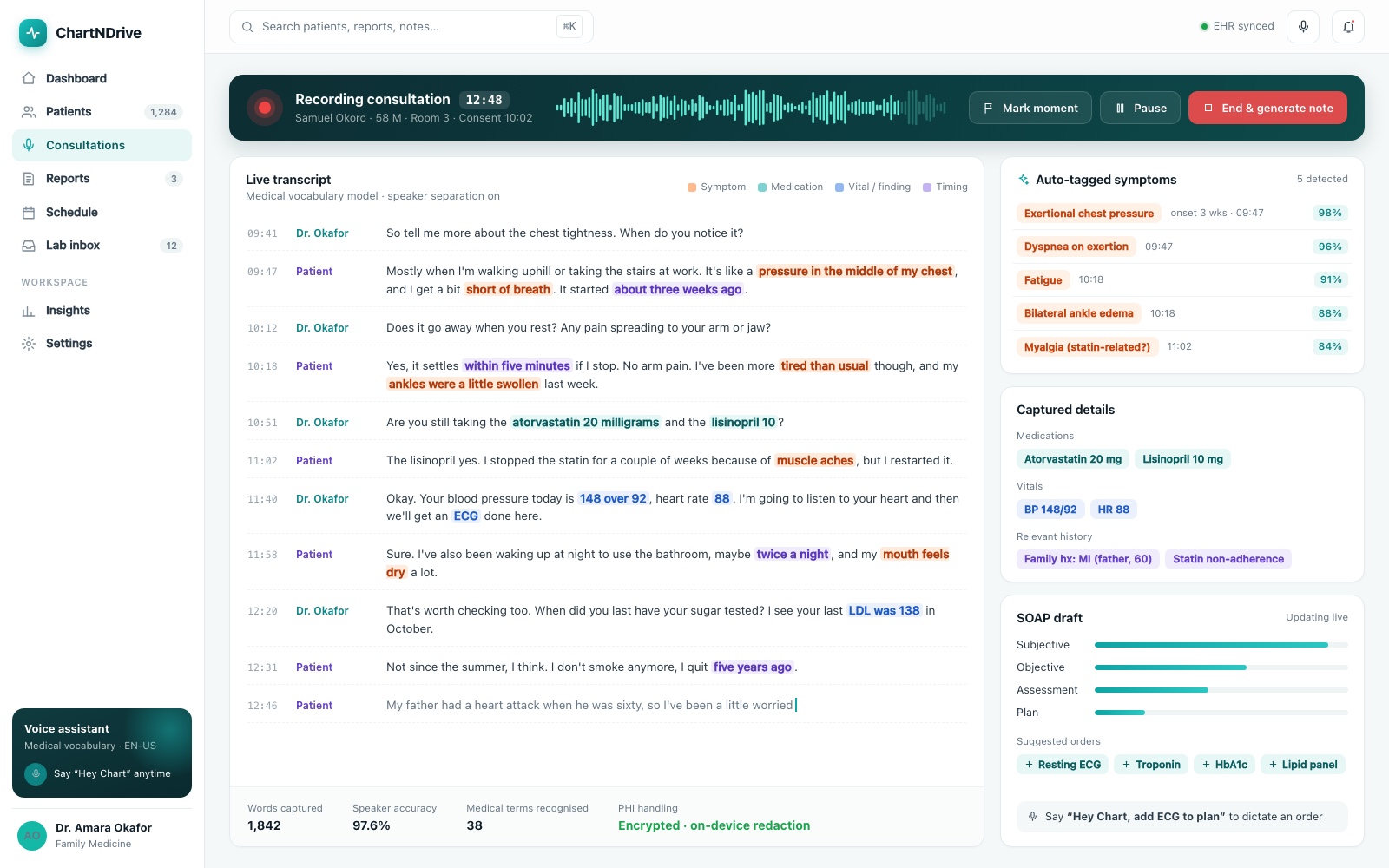
During a visit, ChartNDrive records the conversation and transcribes it live, separating doctor and patient. As the conversation goes on, the assistant picks out symptoms, medications, vitals and timing, and builds the draft note in the background. The doctor can mark key moments or pause the recording without breaking the flow of the consultation.
- Live transcript with highlighted clinical terms
- Auto-tagged symptoms and captured details such as medications and vitals
- A structured draft that fills in while the consultation is still happening
Generated consultation report
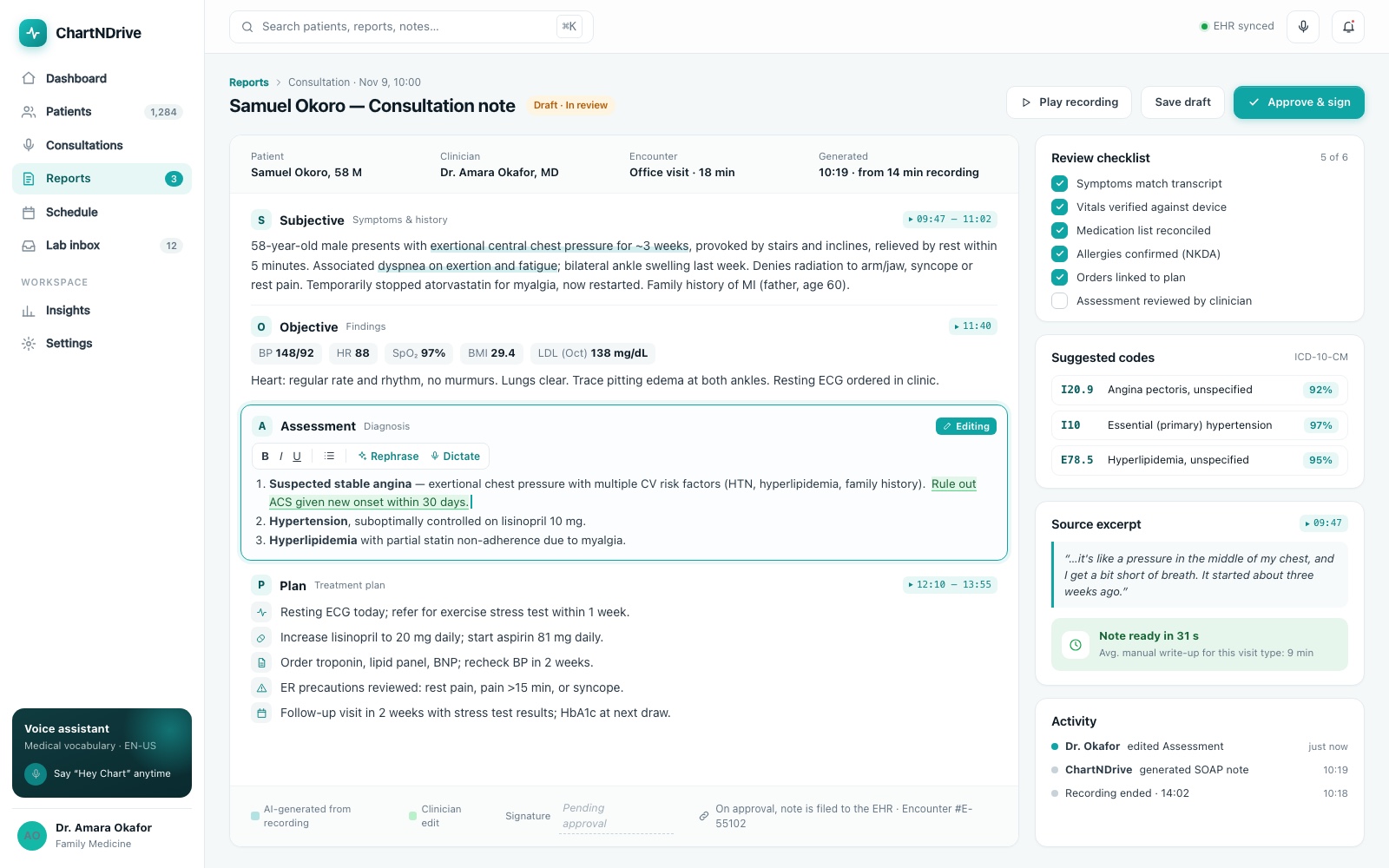
When the recording ends, the assistant produces a structured medical report covering symptoms, findings, assessment and treatment plan. The report opens in a review state. The doctor can edit any section, rephrase it or dictate changes, check items off a review checklist, and jump back to the source excerpt from the recording. Nothing is final until the physician selects Approve & sign.
Hands-free on tablet and mobile
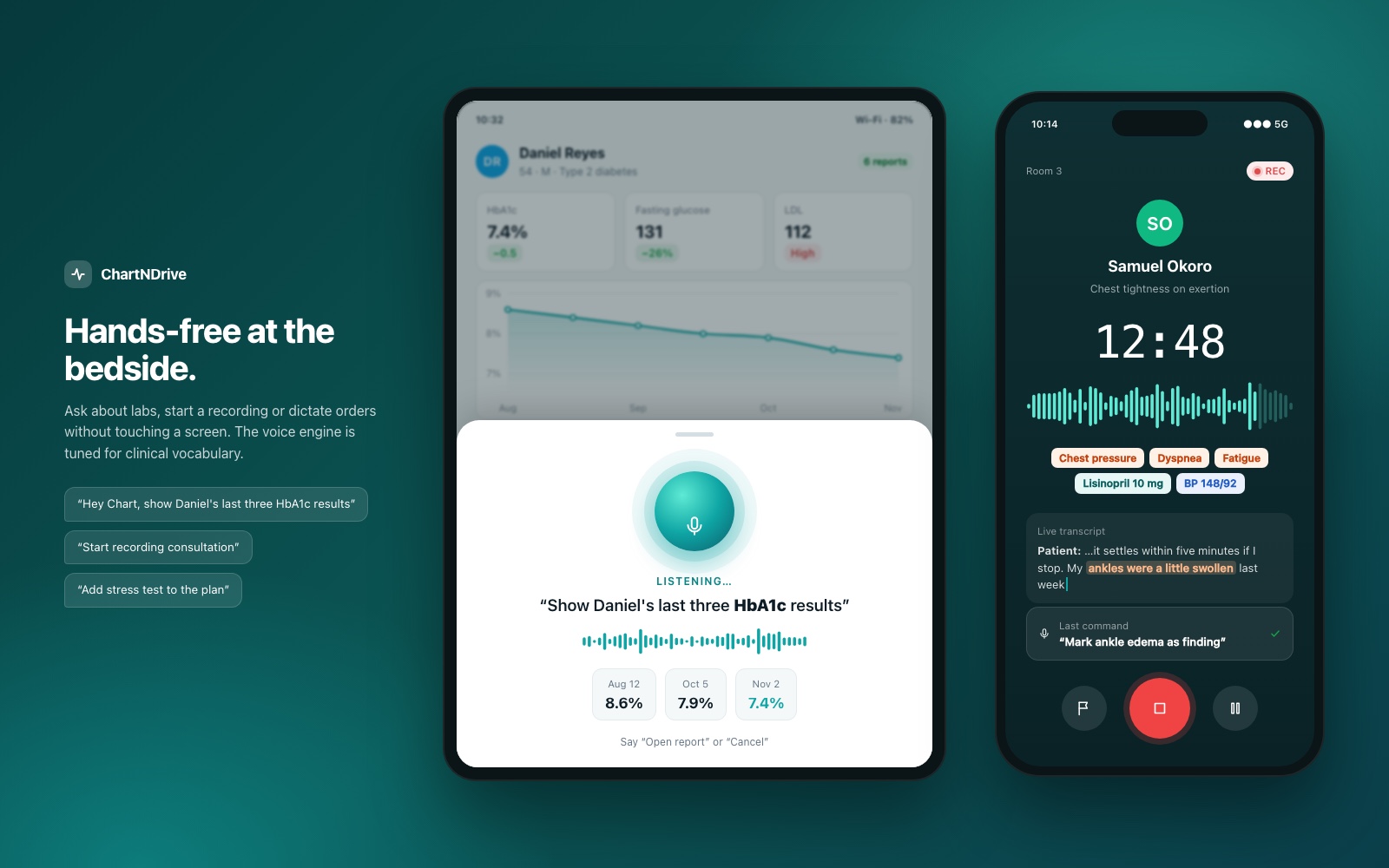
At the bedside or between exam rooms, doctors use ChartNDrive on tablet and phone. A voice-command overlay listens for the wake phrase and carries out commands like showing recent lab results, starting a recording, or adding an item to the plan. The mobile recording view keeps the timer, tagged symptoms and the last command in sight with large, easy-to-tap controls.
Under the hood
- Voice recognition tuned for medicine. The engine is tuned for medical terminology, so drug names, dosages and clinical phrases are captured well enough for a hands-free workflow.
- NLP report parsing. Uploaded reports become structured data the assistant can reason over, which is what makes trend questions possible.
- Transcription to structured notes. Consultation audio is transcribed and then summarized into distinct sections for symptoms, diagnosis and treatment plan.
- Traceability. Answers and notes keep references to their source reports and recording timestamps, so the doctor can review them quickly.
- Human-in-the-loop. Every AI-generated note goes through a draft, edit and approval lifecycle.
Results
- Up to 50% less time on clinical documentation. Ambient recording and automated summaries take most of the write-up off the physician's plate, which leaves more time for patients.
- Fewer data-entry errors. Information is extracted directly from lab results and consultation recordings instead of being retyped by hand, which reduces manual transcription mistakes.
Above all, ChartNDrive changes where the doctor's attention goes. The administrative work happens in the background, and the physician's job becomes reviewing and approving rather than writing from scratch.