Manufacturing & Field Services · AI · 2022
Blinkin
An AI-driven visual diagnostic platform that guides field service and manufacturing teams through real-time SOP flows.
- React Native
- Python
- Computer vision
- GCP
- more issues solved on the first visit
- 30%
- more issues solved on the first visit
Overview
Blinkin is a multimodal AI platform for frontline industrial work. Teams use it to build "Agentic Apps": applications that use a proprietary Visual Language Model (VLM) to see, hear and guide people through complex tasks. It is used mainly in manufacturing and field services, where it turns static Standard Operating Procedures (SOPs) into interactive, real-time diagnostics.
We contributed across the platform. We maintained and optimized the no-code visual builder, Blinkin Canvas. We built low-latency backend services for real-time video, image and voice. We designed and built the Blinkin Launchpad, the hub for distributing and governing apps, and we built the APIs that sync diagnostic results back to enterprise ERP systems.
The challenge
Frontline technicians worked from static SOP documents. A PDF can't see the valve in front of the technician, can't tell whether a gauge reading is in range, and can't adapt when something unexpected turns up. Complex faults often meant a second or third visit.
Enterprises had a second problem. Even with AI-guided apps, they had no easy way to build, distribute and govern them across many sites, with the right people getting the right version. Every piece of work also had to be fast. When a technician points a camera at equipment, the AI's response has to feel instant, or they go back to the paper.
Goals
- Let operations teams build AI-guided procedures without writing code.
- Make the AI's vision and voice feel immediate in the field by keeping multimodal latency low.
- Give enterprise clients one place to distribute, version and control access to their agentic apps across every site.
- Turn what happens on site into structured business data in the systems enterprises already use.
- Raise the number of issues technicians resolve on the first visit.
Our approach
We treated Blinkin as one system with four touchpoints: authoring, field use, distribution and the back office. A procedure built on Canvas becomes an app on the technician's device, gets rolled out through Launchpad, and ends as a record in the client's ERP. Every decision had to work for both the person building the flow and the person standing next to the equipment.
On the authoring side, we focused on keeping complex logic readable on a visual canvas: branches, retries, AI checks and integrations as nodes. On the runtime side, we focused on latency. Video, images and voice are high-bandwidth, so the backend services were built so the model's response arrives while the technician is still looking at the part. For enterprise rollout, we built governance in from the start: access groups, versions and controlled deployment rather than a single shared link.
What we built
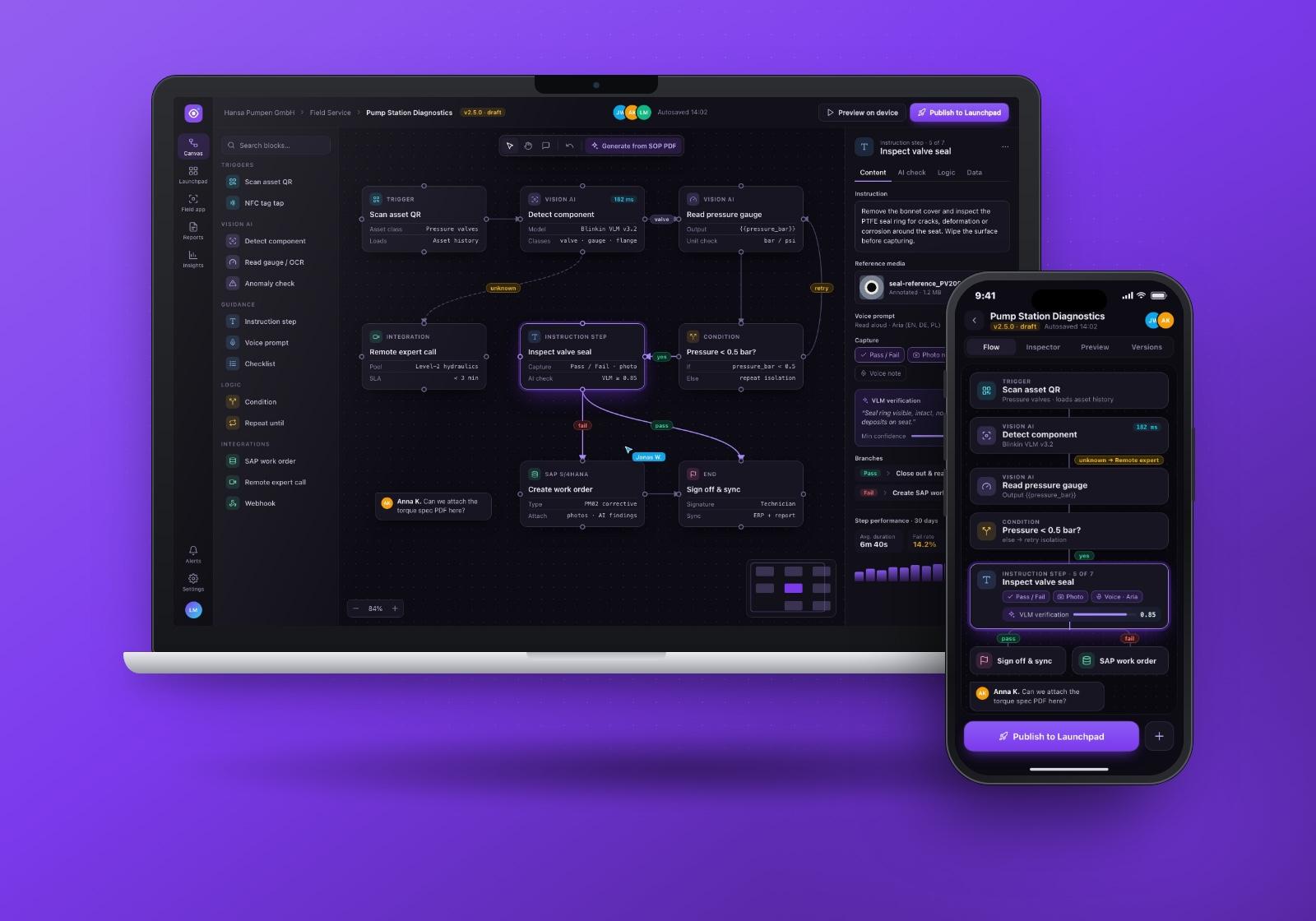
Blinkin Canvas: no-code flow builder
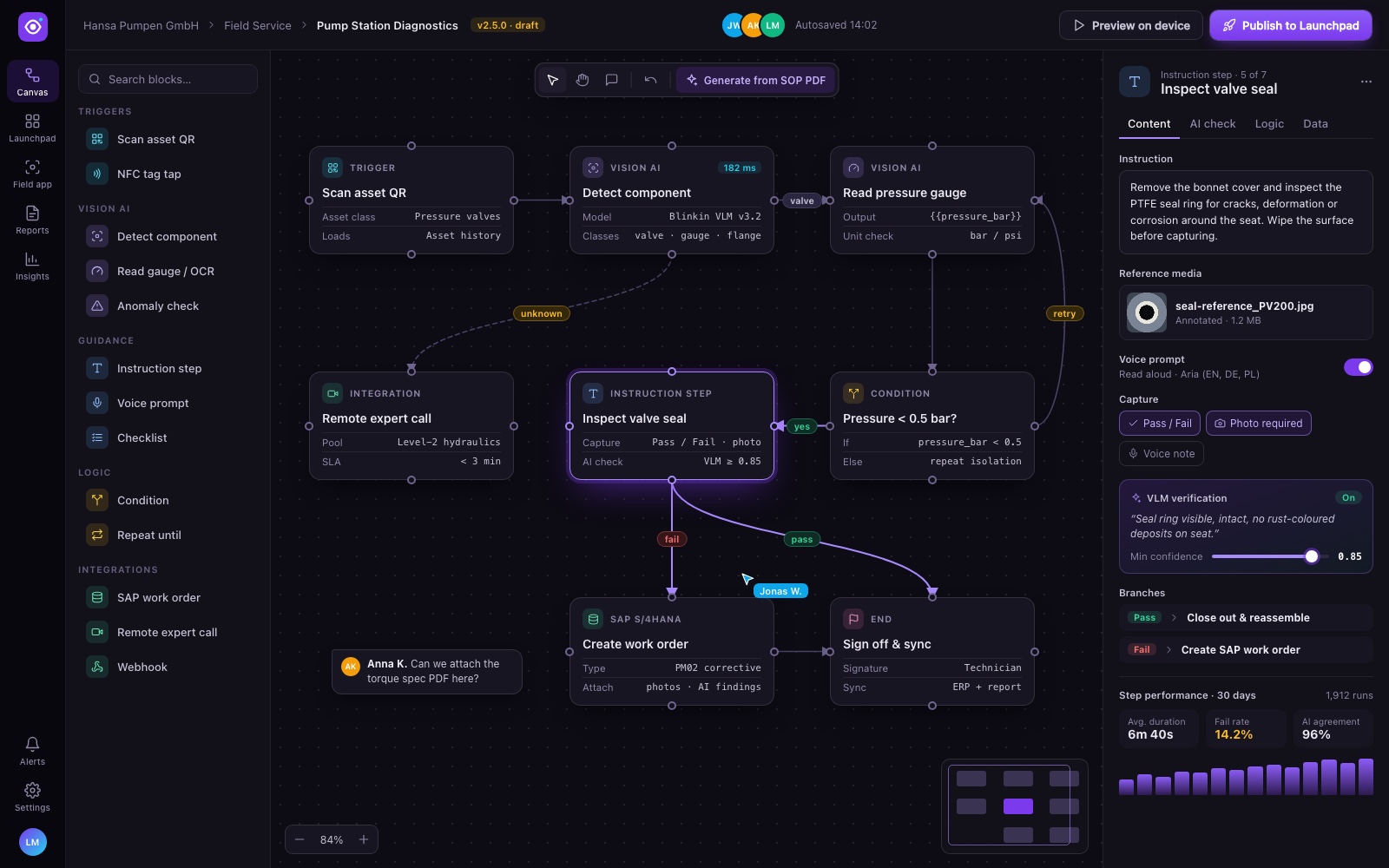
Canvas is a drag-and-drop builder where operations teams turn an SOP into a working flow. Blocks for triggers, vision AI, guidance, logic and integrations connect into a graph with clearly labelled branches, such as pass/fail paths and retry loops. A step inspector sets the instruction text, reference media, voice prompts, required captures and the AI verification rule with its confidence threshold.
Technician field app
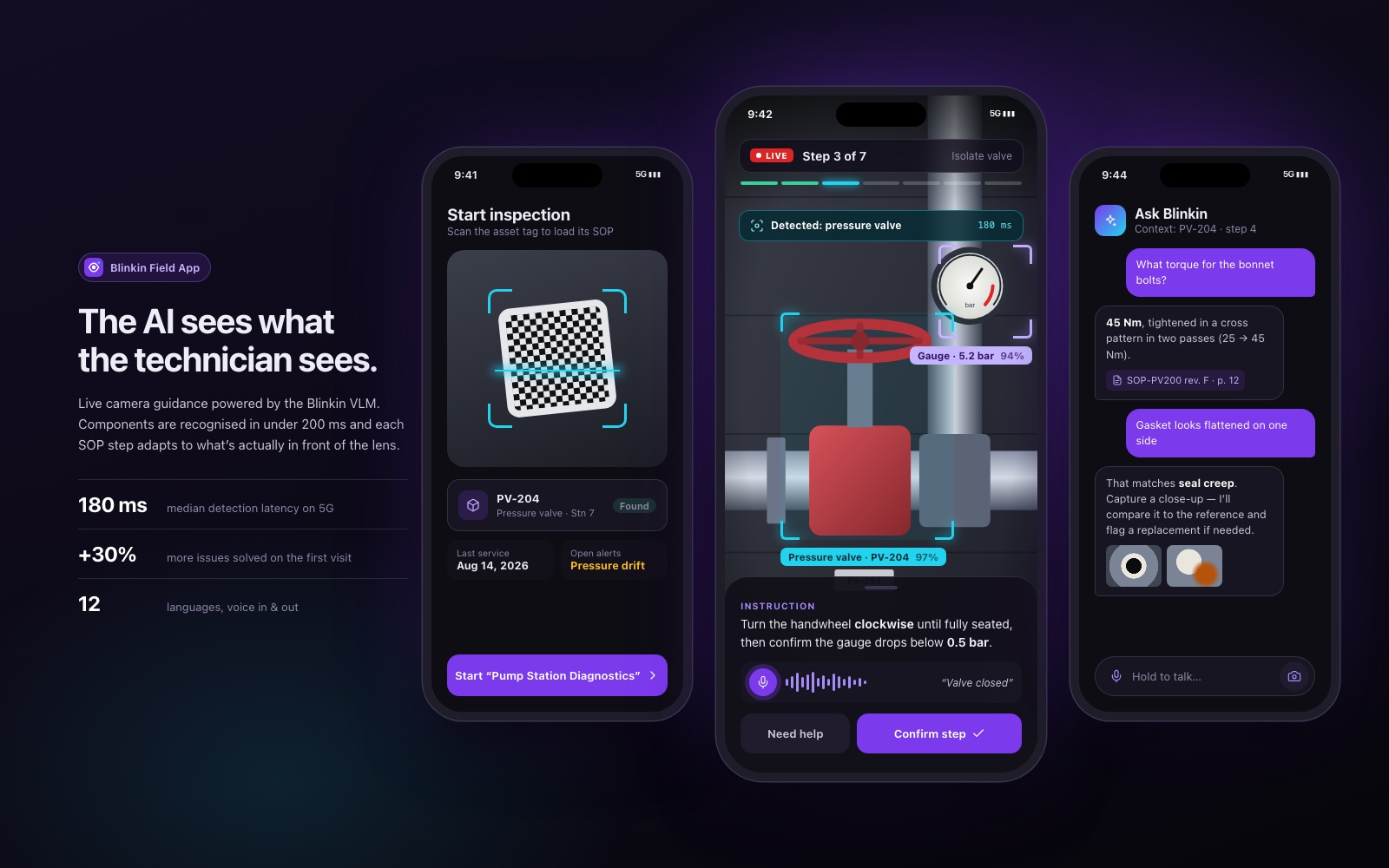
On site, the technician scans an asset tag and the matching procedure loads. The live camera view overlays what the VLM recognises (components, gauge readings) along with the current step and progress through the procedure. Voice works both ways: the technician can confirm a step by speaking, or ask a question and get an answer grounded in the SOP.
Guided SOP step with AI verification
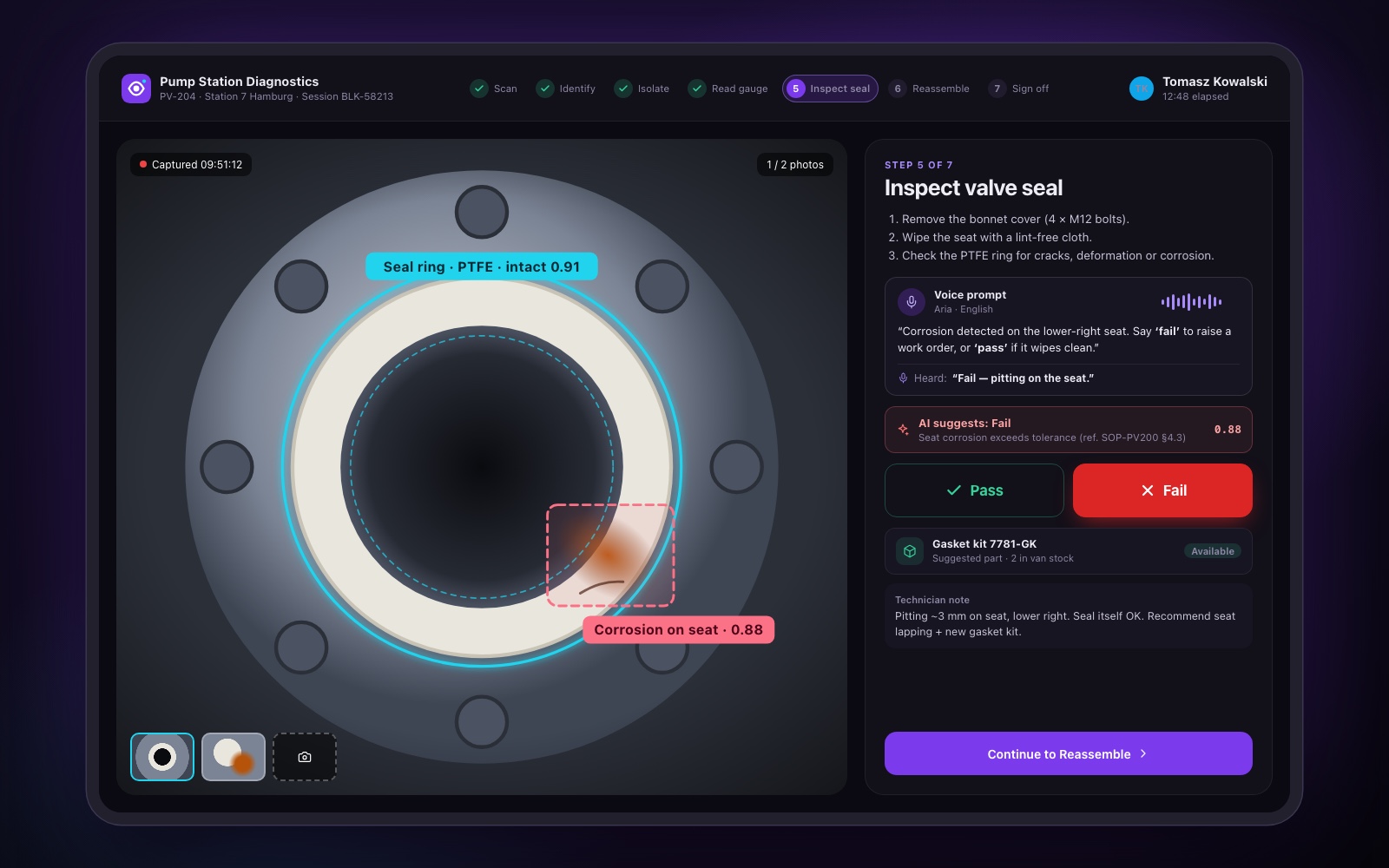
Each guided step pairs a clear instruction card with the evidence it needs. The technician captures photos, the model annotates what it finds with confidence scores, and the AI suggests a pass or fail with a reference to the relevant SOP section. The technician makes the final call, by tap or by voice, and can add a note. A failed check can lead straight to the follow-up the flow defines.
Blinkin Launchpad
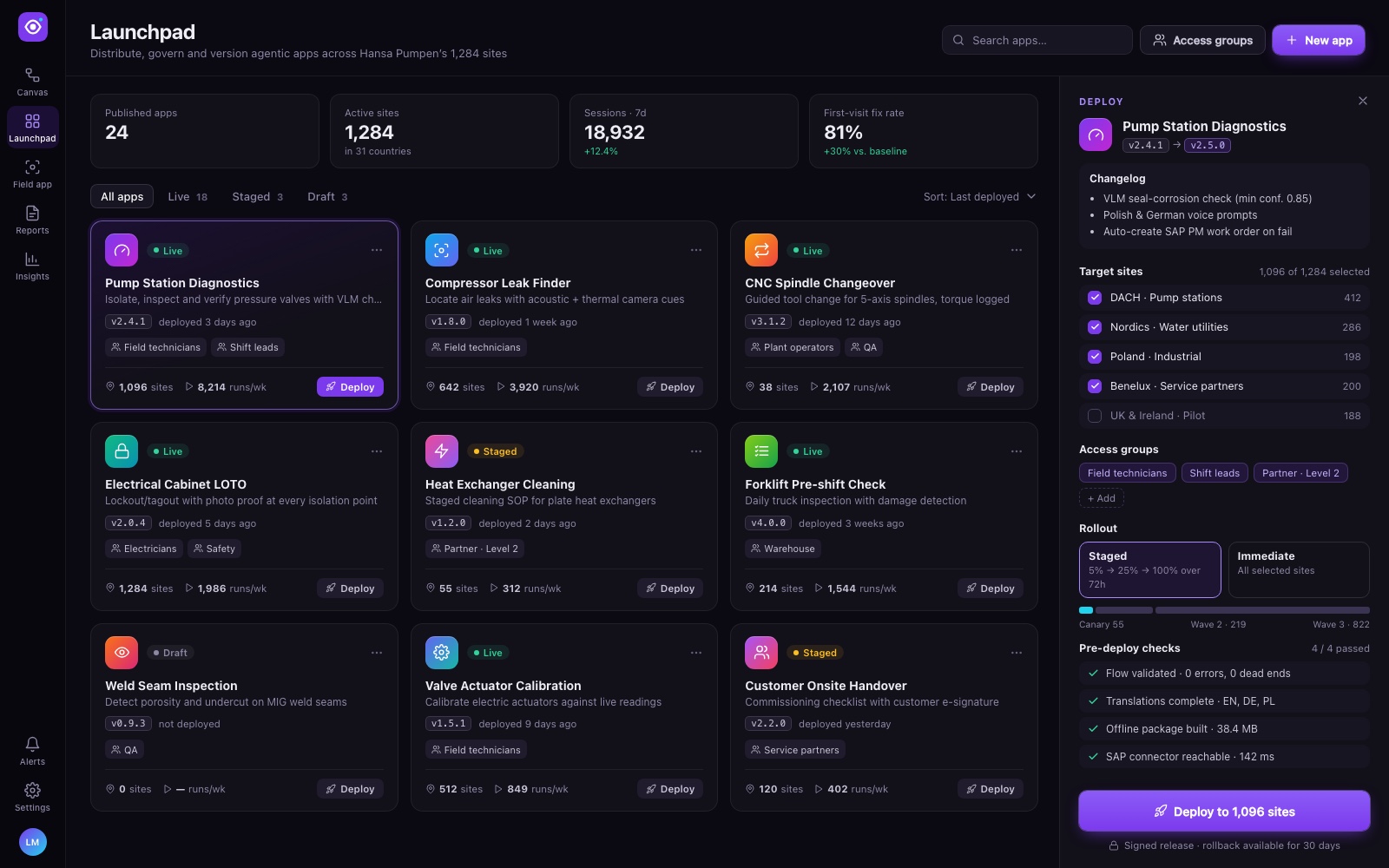
We designed and built Launchpad as the central hub for distributing and governing agentic apps. It lists every app with its status, current version, access groups and site coverage. Deploying a new version opens a panel with the changelog, target site groups, access groups, a rollout strategy and pre-deploy checks, then deploys to the selected sites in one action.
- Access control through access groups, so the right roles see the right apps.
- Version management with clear version history and rollout options.
Diagnostics report and ERP sync
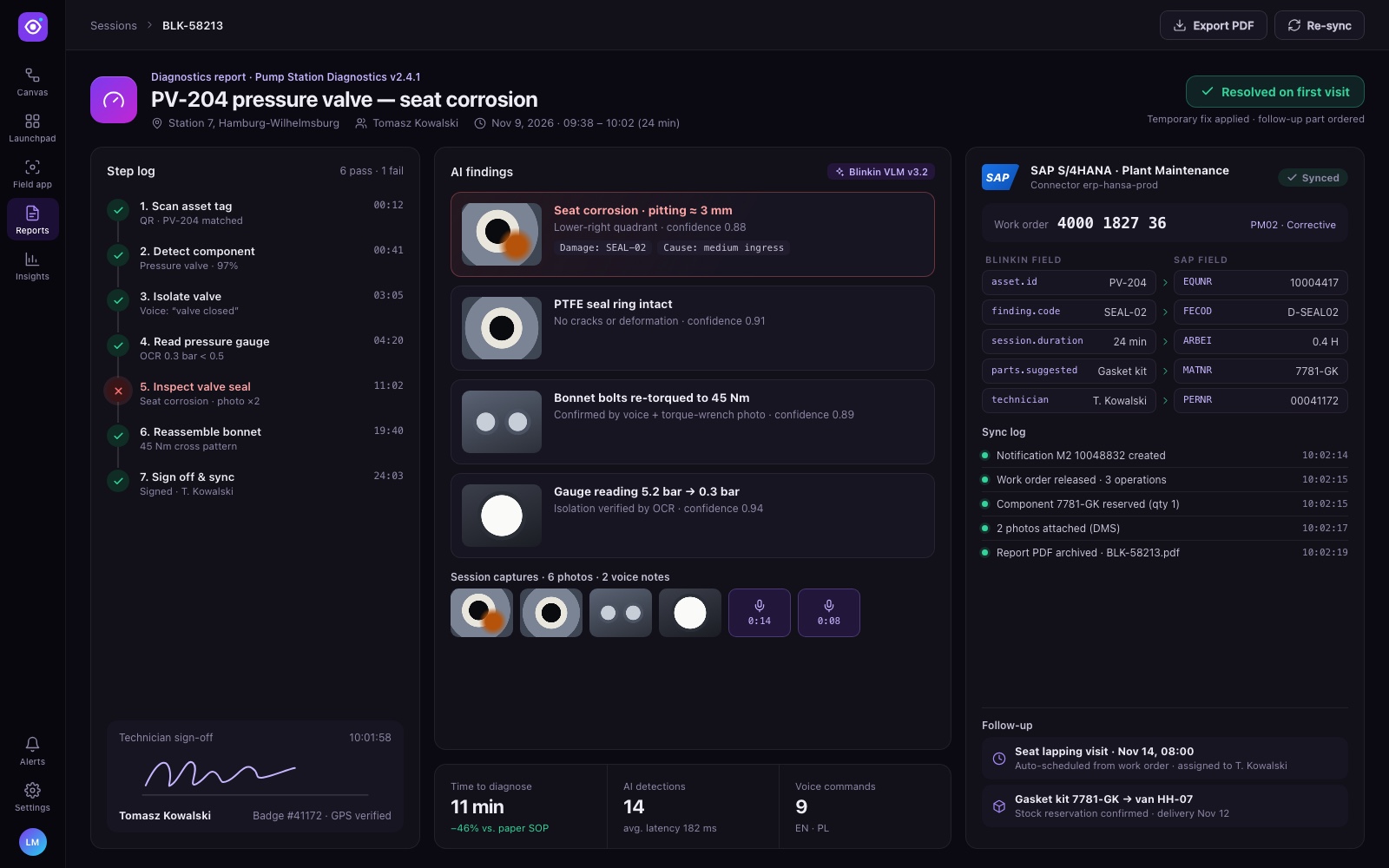
When a session ends, Blinkin produces a diagnostics report: a timed step log, the AI findings with their captured evidence, and the technician's sign-off. The same screen shows the enterprise integration at work. Blinkin fields map onto the ERP's fields, a work order is created, and a sync log confirms each record as it is written back.
Under the hood
- Multimodal data engineering. Backend services handle high-bandwidth real-time video, images and voice, and we tuned them for low latency so the AI's "vision" feels instant to the person holding the device.
- Proprietary VLM in the loop. Apps call Blinkin's Visual Language Model at the steps where the flow needs it, such as component detection, gauge reading and anomaly checks. Canvas exposes these as configurable blocks.
- Canvas performance. We maintained and optimized the drag-and-drop builder so large, branching logic flows stay responsive while being edited.
- Governed distribution. Launchpad handles app distribution, secure access control and version management, so enterprise clients control who runs what, where.
- Enterprise integration APIs. APIs sync app data back into existing ERP systems, turning visual diagnostics into actionable business data instead of a separate silo.
Results
- 30% more issues solved on the first visit, as field technicians work with AI-guided visual assistance, which reduces downtime.
- One-click scale. Launchpad lets enterprise clients deploy custom agentic apps across thousands of global sites in one click.
Taken together, the work turned static SOPs into procedures that react to what the technician is actually seeing. Operations teams can build and update those procedures without code, roll them out across their sites under proper governance, and see the results in the business systems they already use.