Marketing & Social Media · Web · 2025
Social Agent
An automated scheduling platform that handles complex, time-zone-aware post deployment across global social networks.
- Facebook Graph API
- Instagram Graph API
- OAuth2
- less time on social media management
- 70%
- less time on social media management
- successful post deployment rate
- 99.9%
- successful post deployment rate
Overview
Social Agent is a workflow automation platform for brands that run many social identities at once. Drafting, scheduling and publishing all happen in one place, so a team can keep a consistent presence across regions without anyone posting by hand at odd hours.
We designed and built the platform end to end. That covered the time-zone-aware scheduling engine, the Facebook Graph API and Instagram Graph API integrations with their OAuth2 flows, a background publishing queue built to survive failures, and a real-time analytics dashboard that turns raw engagement data into trends people can act on.
The challenge
Brands with several social accounts across regions were doing most of the work manually. Someone had to post each update by hand, work out what "9am" meant for audiences in London, Dubai and New York, and then collect performance numbers from each platform one at a time. Missed slots and failed posts were common.
The hard part was more than the interface. Automated publishing through the Graph APIs comes with OAuth2 token lifecycles and rate limits. If a token expires or an account hits its hourly limit, a post fails without anyone noticing unless the system is built to expect it. A scheduler that works on a quiet Tuesday also has to hold up during a holiday campaign, when every account wants to publish at the same peak hour.
Goals
- Let one team plan and publish across every connected Facebook and Instagram account from a single interface.
- Schedule posts for the audience's local time, not the user's.
- Publish reliably during high-traffic periods and API downtime, with failures retried automatically rather than lost.
- Bring engagement data (likes, shares, comments) into one dashboard instead of separate platform exports.
- Cut the time social teams spend on routine management.
Our approach
We treated time zones as a first-class part of the data model, not something the interface converts at the end. Every scheduled post knows which audience it targets and what local time it should land at. The calendar can then show the same plan from any region's point of view, and the engine can publish one campaign to several accounts at the same local hour.
We also assumed from the start that the platform APIs would sometimes fail. Publishing is never a direct call from the interface. Each post becomes a job in a background queue, and that queue owns retries, backoff and rate-limit awareness. That design is behind the reliability numbers below, and it lets users see exactly what happened to every post.
The interface follows the way social teams already work: a calendar to plan, a composer to write, an accounts view to keep connections healthy, analytics to learn from, and a queue for anyone who needs to know whether a post actually went out.
What we built
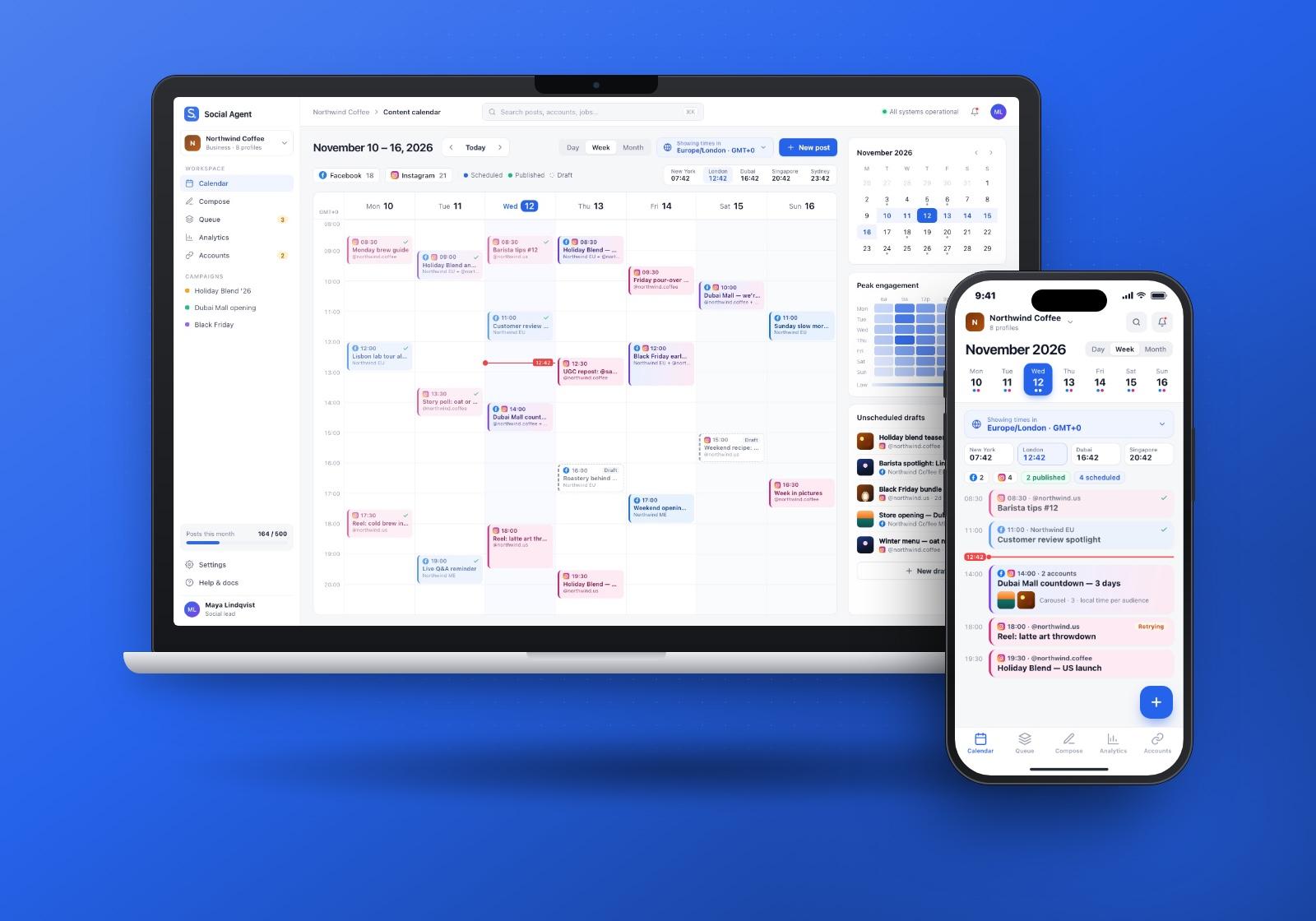
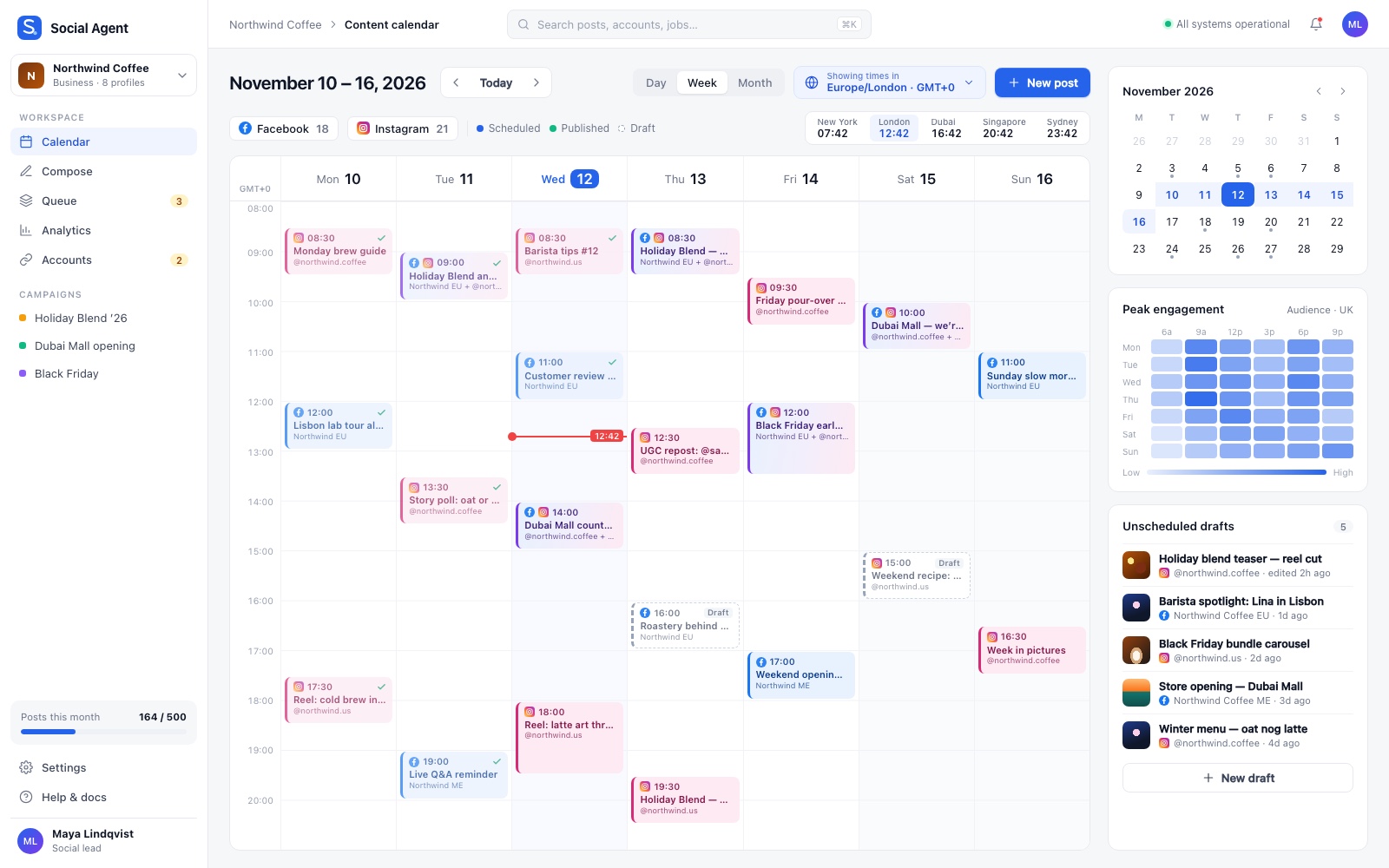
Time-zone-aware content calendar
The calendar is the team's home screen. Posts sit on a week or month grid, colour-coded by network, with scheduled, published and draft states visible at a glance. A time-zone selector and a strip of world clocks let a social lead in one city plan for audiences in several others, and a peak-engagement heatmap sits next to a list of unscheduled drafts waiting for a slot.
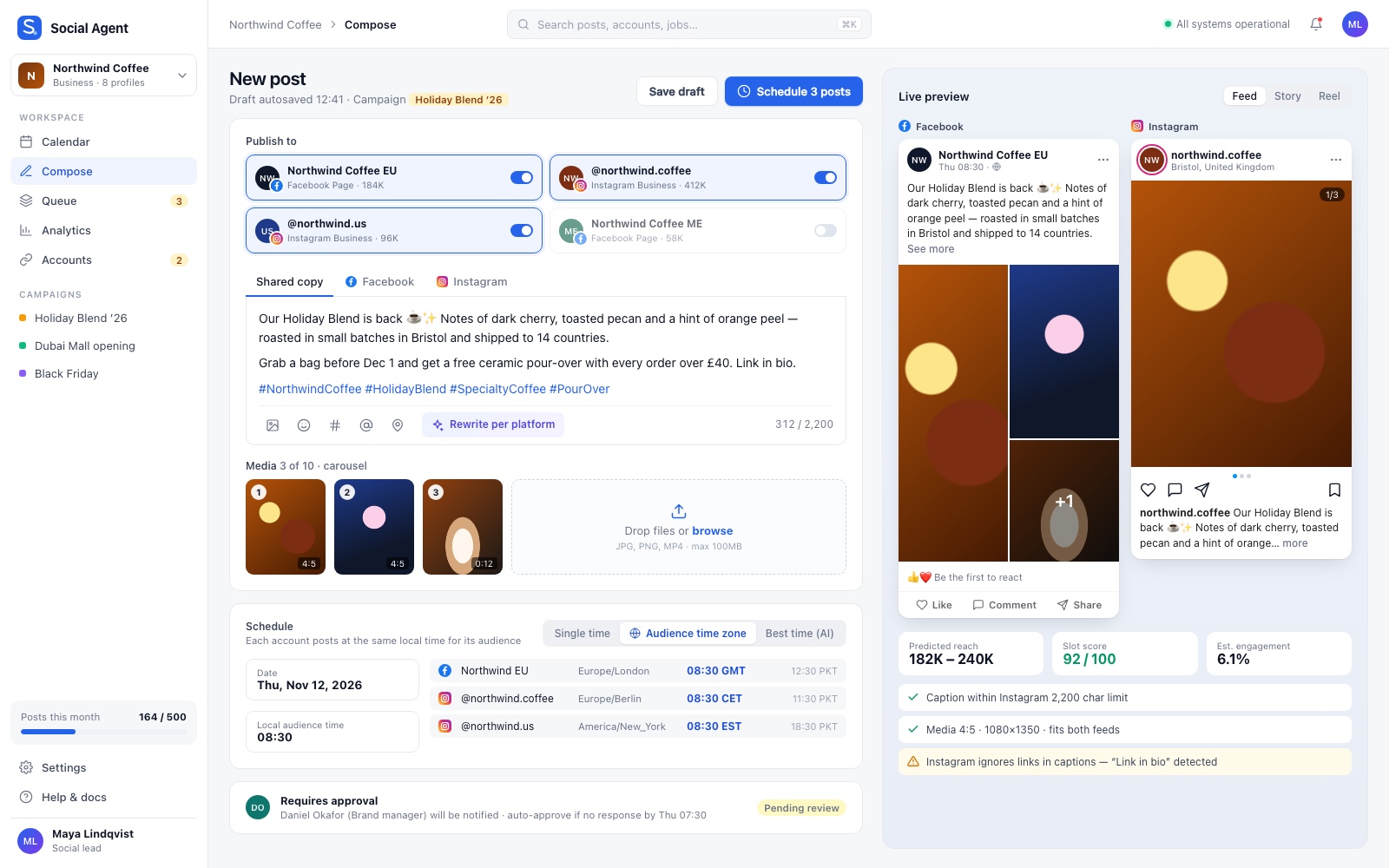
Post composer with live previews
The composer lets a user write once and publish to several accounts. Platform toggles choose the destinations, shared copy can be adjusted per network, and media uploads go straight into a carousel. Live Facebook and Instagram previews show how the post will look before it ships, and inline checks flag platform-specific issues such as caption limits or links that won't be clickable.
- Audience time zone scheduling posts to each account at the same local time for its audience.
- An approval step routes posts to a reviewer before they go live.
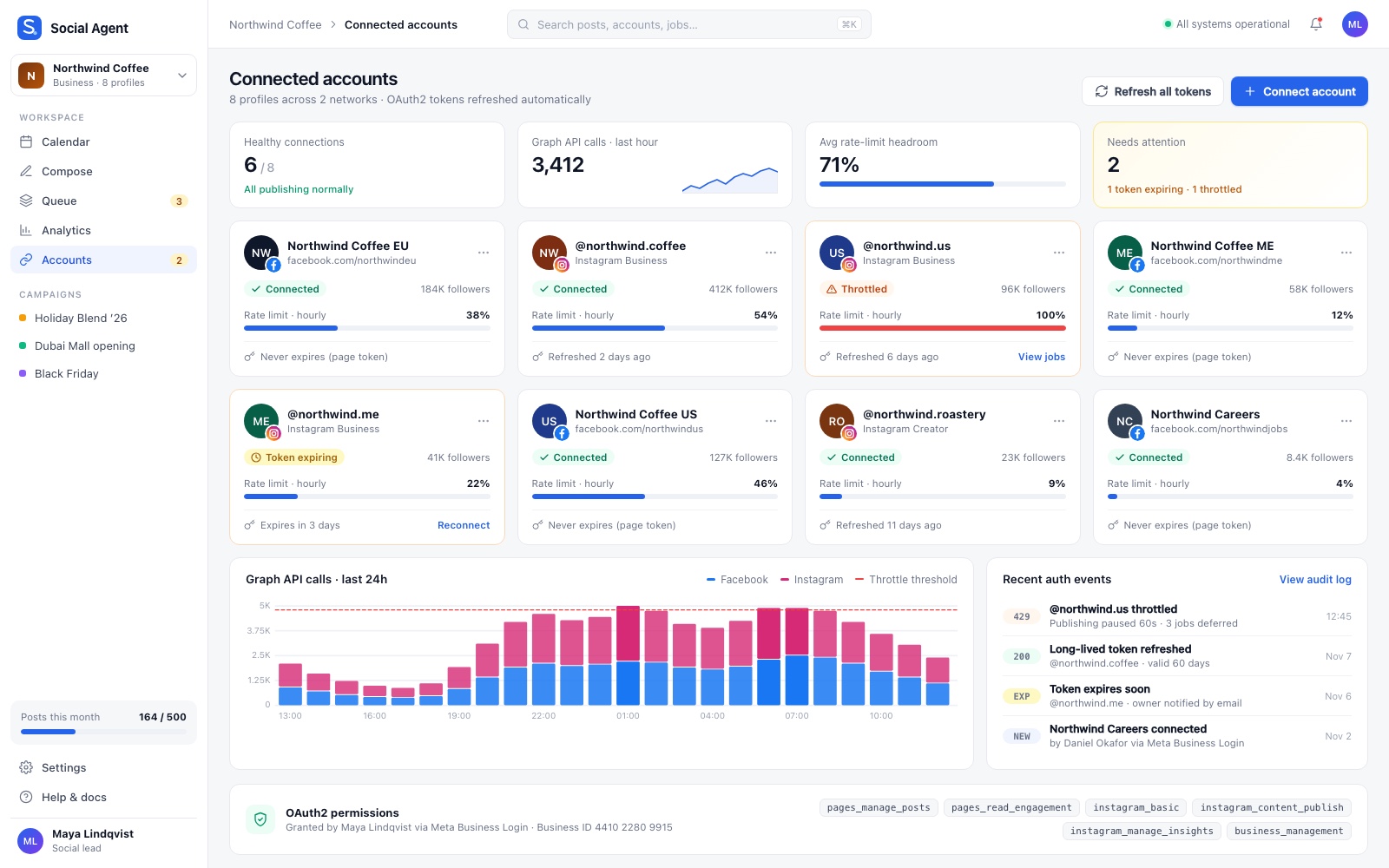
Connected accounts and rate-limit health
Every profile connects through OAuth2, and this screen shows the health of each connection. Cards show the status of each account (connected, throttled or token expiring) with a live rate-limit gauge. A chart of Graph API calls against the throttle threshold and a feed of recent auth events make problems visible before they turn into failed posts.
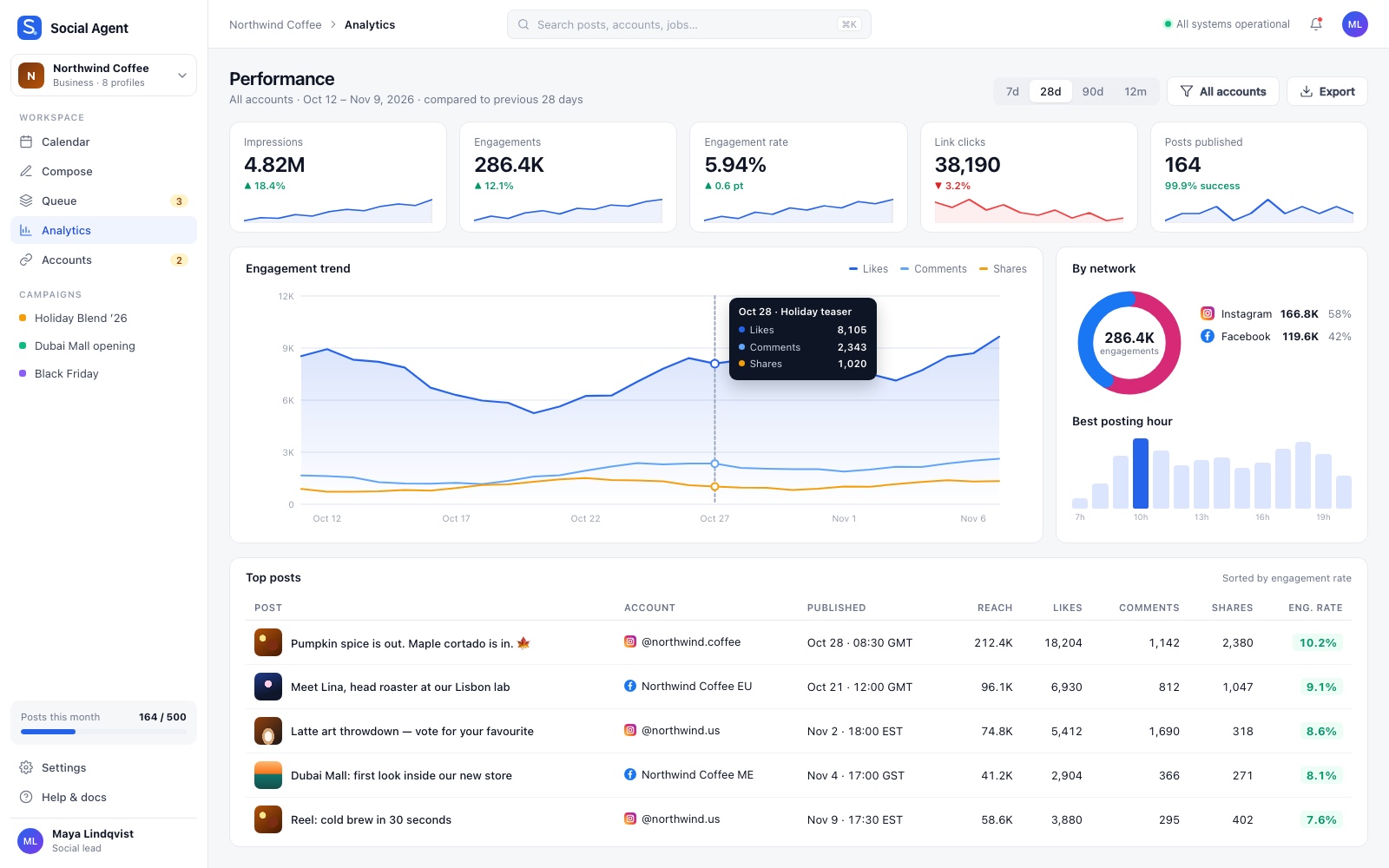
Real-time analytics dashboard
The analytics dashboard collects engagement metrics from every connected account and turns raw API data into trends. Headline cards summarise performance for the selected period. An engagement trend chart breaks out likes, comments and shares, and a top-posts table ranks content by engagement rate. Network split and best-posting-hour views feed back into planning on the calendar.
Publishing queue
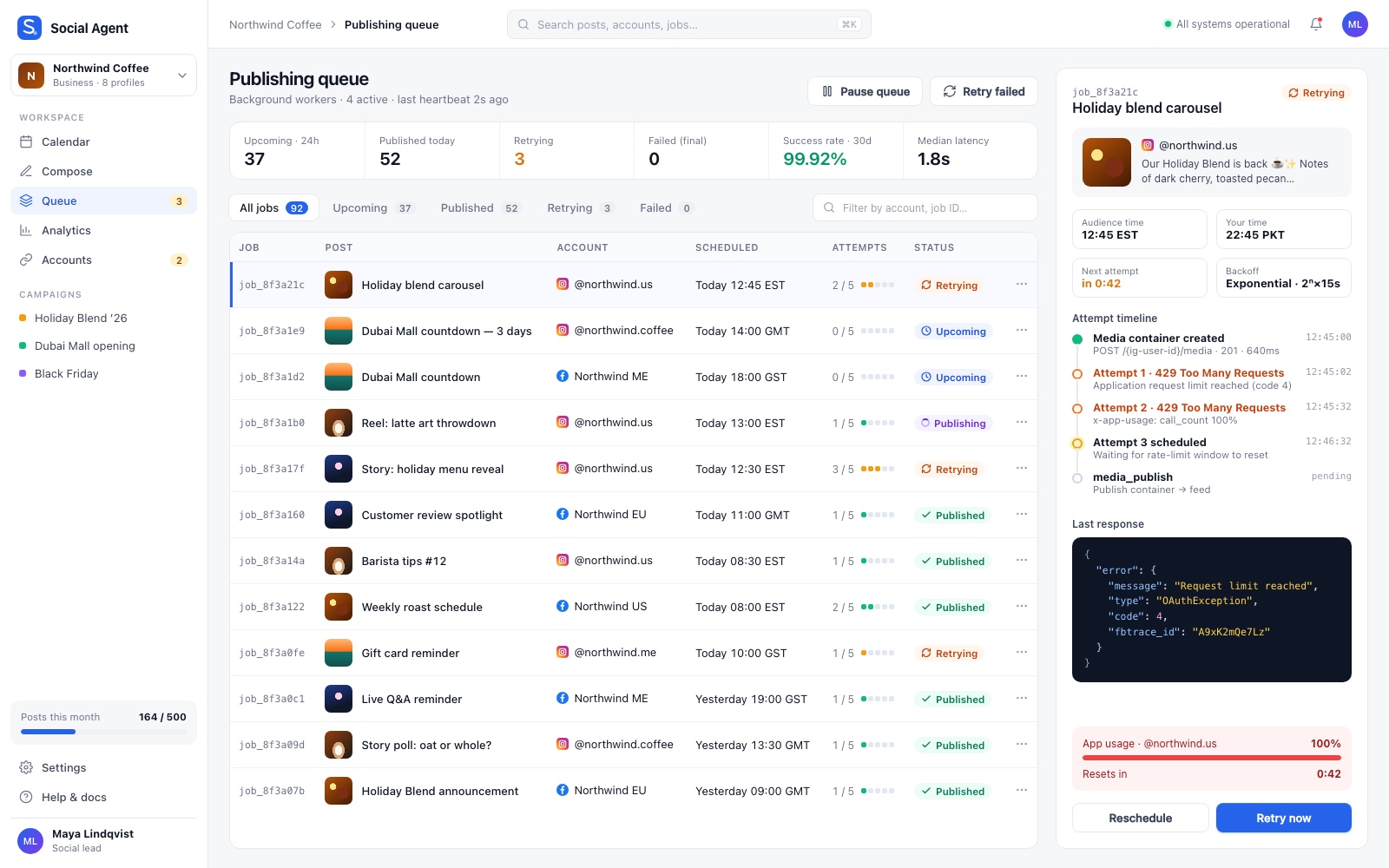
The queue is where reliability becomes visible. Each job shows its account, its scheduled time in the audience's zone, its attempt count and a status: upcoming, publishing, published or retrying. Opening a job shows the full attempt timeline, the raw API response and the backoff schedule, so a "429 Too Many Requests" error is something the system waits out rather than a lost post.
Under the hood
- Graph API integrations. We built deep integrations with the Facebook Graph API and Instagram Graph API for publishing and for reading engagement data, so one product handles both write and read.
- OAuth2 authentication. Accounts connect through OAuth2 flows, and the platform tracks token state so expiring connections show up before they cause failures.
- Rate-limit awareness. Automated publishing runs inside the limits the APIs enforce. The queue tracks usage per account and holds jobs back when an account is throttled, instead of firing requests that will be rejected.
- Resilient background jobs. Publishing runs in a background job system with error handling and retry logic, designed to stay reliable during high-traffic periods and API downtime.
- Time-zone scheduling engine. Custom scheduling logic resolves each post to a precise, time-zone-specific publish moment, so global campaigns reach audiences at peak engagement times whatever the user's local time.
Results
- 70% less time on social media management, on average, for active users.
- 99.9% successful post deployment rate across all integrated platforms, thanks to error handling and retry logic.
Beyond the numbers, Social Agent replaced a manual, error-prone routine with one place to plan, publish and measure. Teams no longer convert time zones in their heads or check each platform to confirm a post went out. Global campaigns land at the right local hour, and failures are retried automatically instead of being discovered after the fact.