Education · Web · 2023
Edudemic
A comprehensive SaaS school management system designed to unify administrative tasks and enhance the learning journey for all stakeholders.
- React
- Node.js
- MongoDB
- less administrative workload
- 50%
- less administrative workload
- tailored role dashboards
- 4
- tailored role dashboards
Overview
Edudemic is a Software-as-a-Service school management system built for the many needs of modern schools. It digitizes everything from attendance to academic reporting and works as a "Digital Campus": one platform where administrators, teachers, students and parents all work from the same information.
We designed and built the platform as a multi-tenant SaaS. That covered the authentication and authorization framework behind four role-based experiences, the automation for enrollment, attendance and grading, a parent-teacher communication hub with real-time notifications, and the infrastructure that lets each school customize its own environment.
The challenge
Schools were running on fragmented departments and manual processes. Enrollment, attendance and grading were tracked separately, often in different tools or on paper. Data was inconsistent between offices, and reporting meant reconciling several versions of the same facts.
Parents had little visibility. They usually learned about a child's progress at the end of a term, or when something had already gone wrong. Building a fix was hard because it had to serve four very different audiences without exposing the wrong data to the wrong person, and it had to work for many schools at once, each with its own terms, classes and identity.
Goals
- Give every school one source of truth for students, attendance, grades and communication.
- Give administrators, teachers, students and parents tailored experiences with the right permissions for each.
- Automate the routine administrative work of enrollment, attendance tracking and grading.
- Give parents real-time visibility into academic performance and school announcements.
- Run many schools on one platform, with each one able to customize its environment securely.
Our approach
We started from roles, not modules. Instead of one interface with features hidden behind permissions, each of the four roles (Admin, Teacher, Student, Parent) gets its own dashboard built around the questions that person asks every day. One shared data model underneath means an attendance mark entered by a teacher is immediately the same fact the admin reports on and the parent is notified about.
We made multi-tenancy a foundation of the architecture rather than something added later. Each school is a tenant with its own branding, academic calendar, class structure and grading rules, while security updates and availability are managed centrally. Schools get a platform that feels like their own without each one running its own deployment.
Throughout, we aimed to remove steps rather than digitize them. Attendance should take a tap, notifications should go out by themselves, and reports should build from data that already exists.
What we built
Admin dashboard
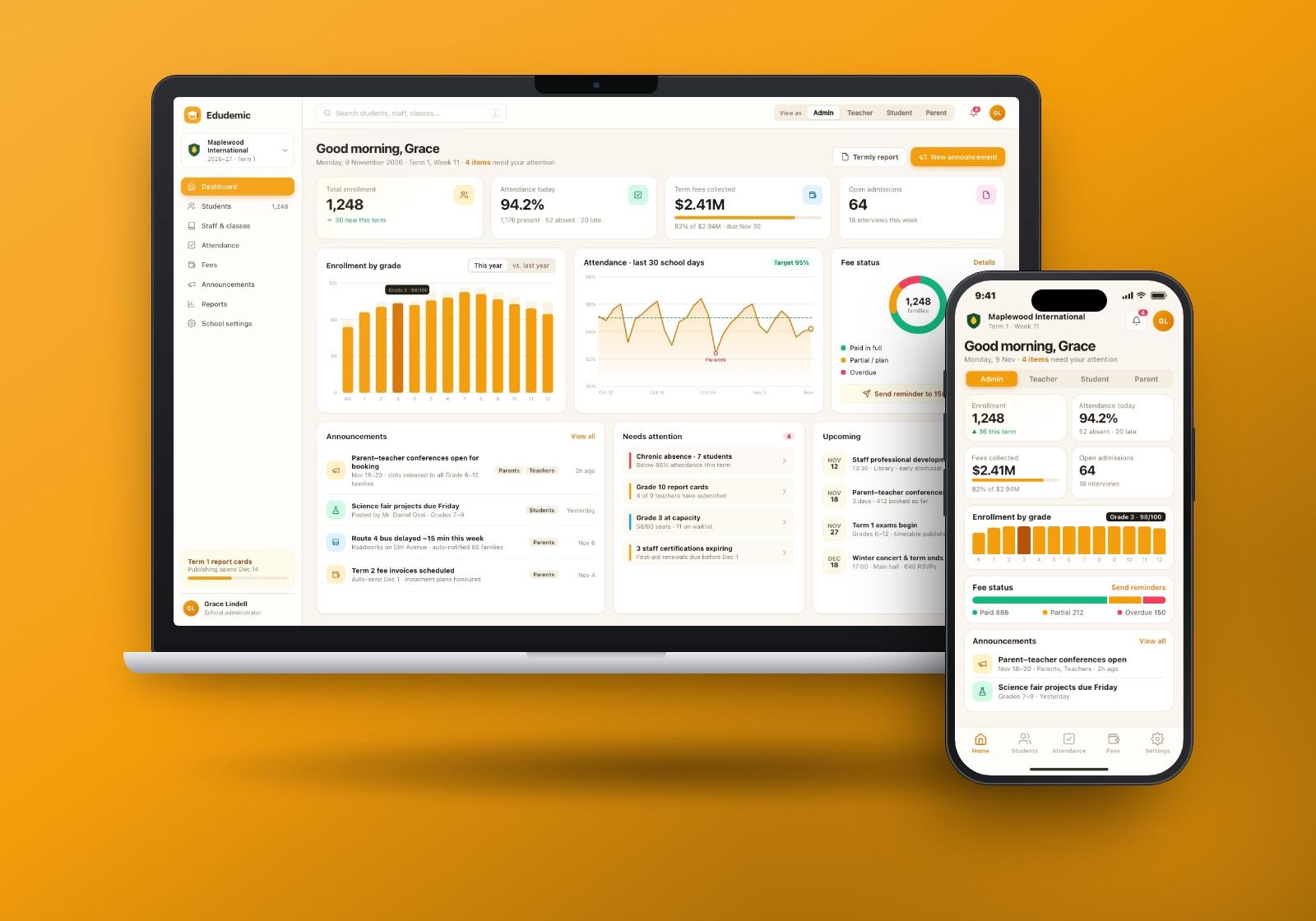
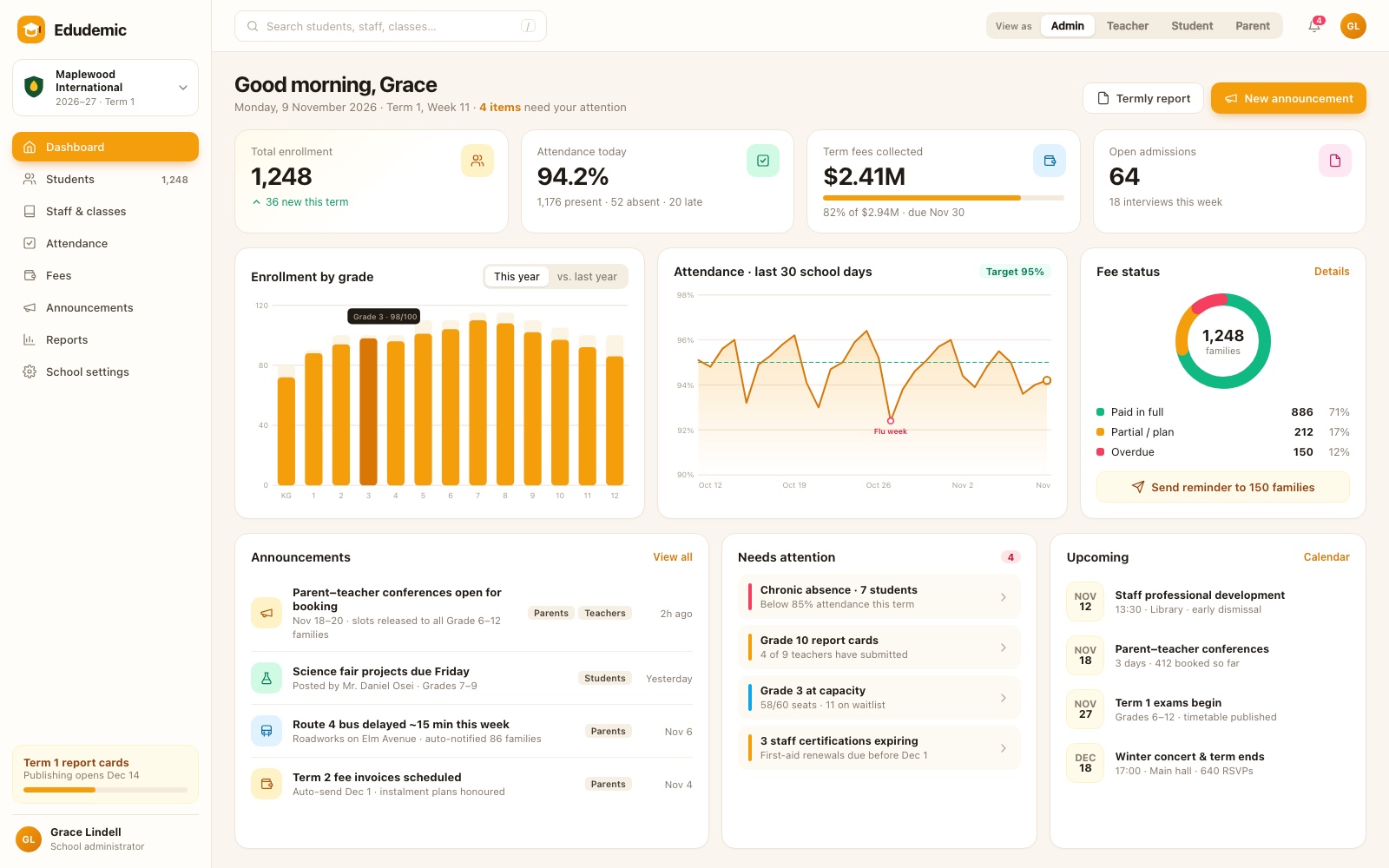
The administrator's dashboard gives a live view of the whole school: total enrollment, today's attendance, fee collection and open admissions. Below the headline numbers are an enrollment-by-grade chart, an attendance trend against target, and a fee-status breakdown with a one-click reminder to families with overdue fees. Announcements, items that need attention and upcoming events complete the view.
Teacher view: attendance and gradebook
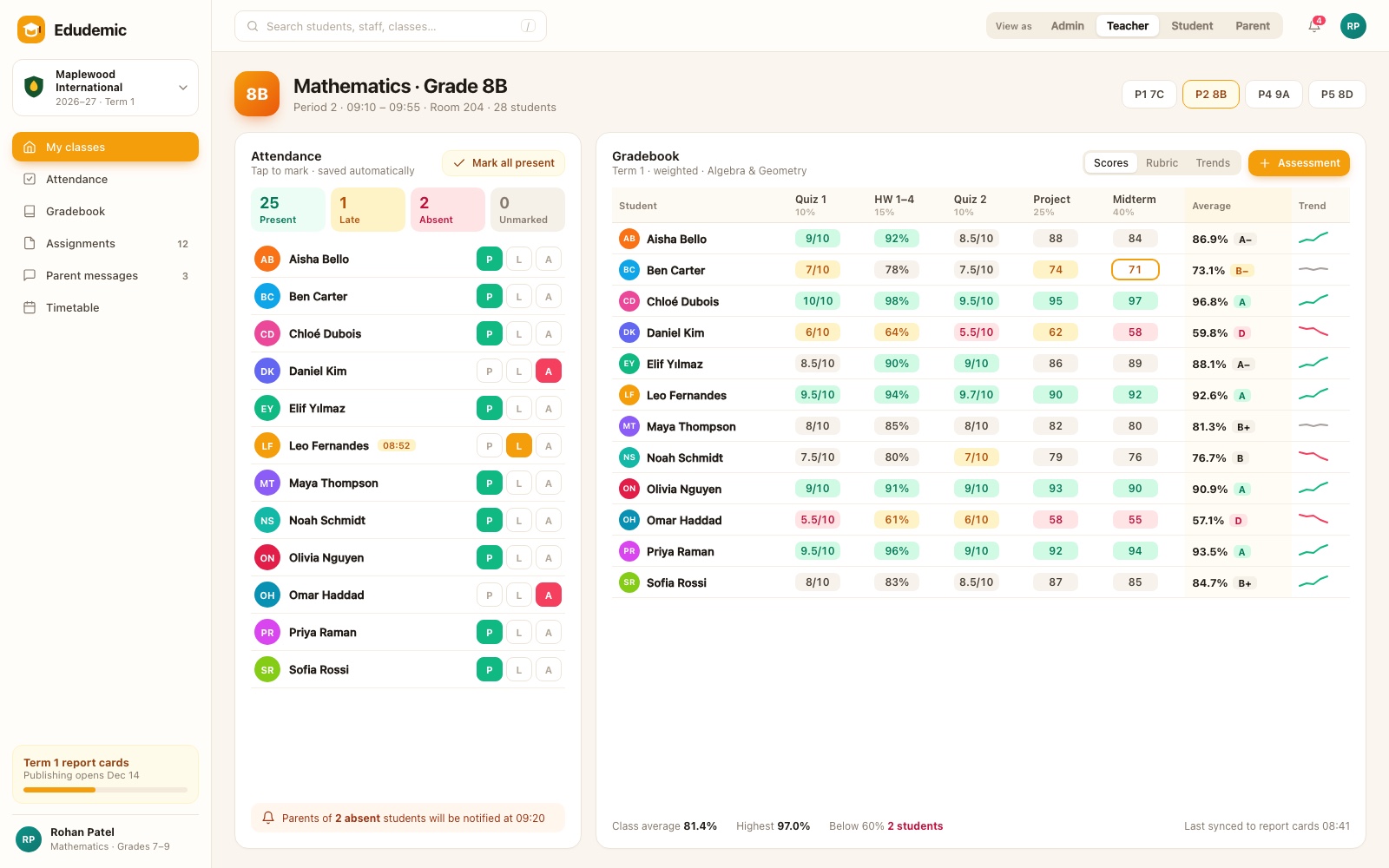
Teachers get the two tools they use most, side by side. Attendance is a class roster with one-tap present, late or absent marks, saved automatically, and parents of absent students are notified without the teacher doing anything else. The gradebook shows weighted assessments for every student, with averages, letter grades and trend lines that make struggling students easy to spot.
Student view
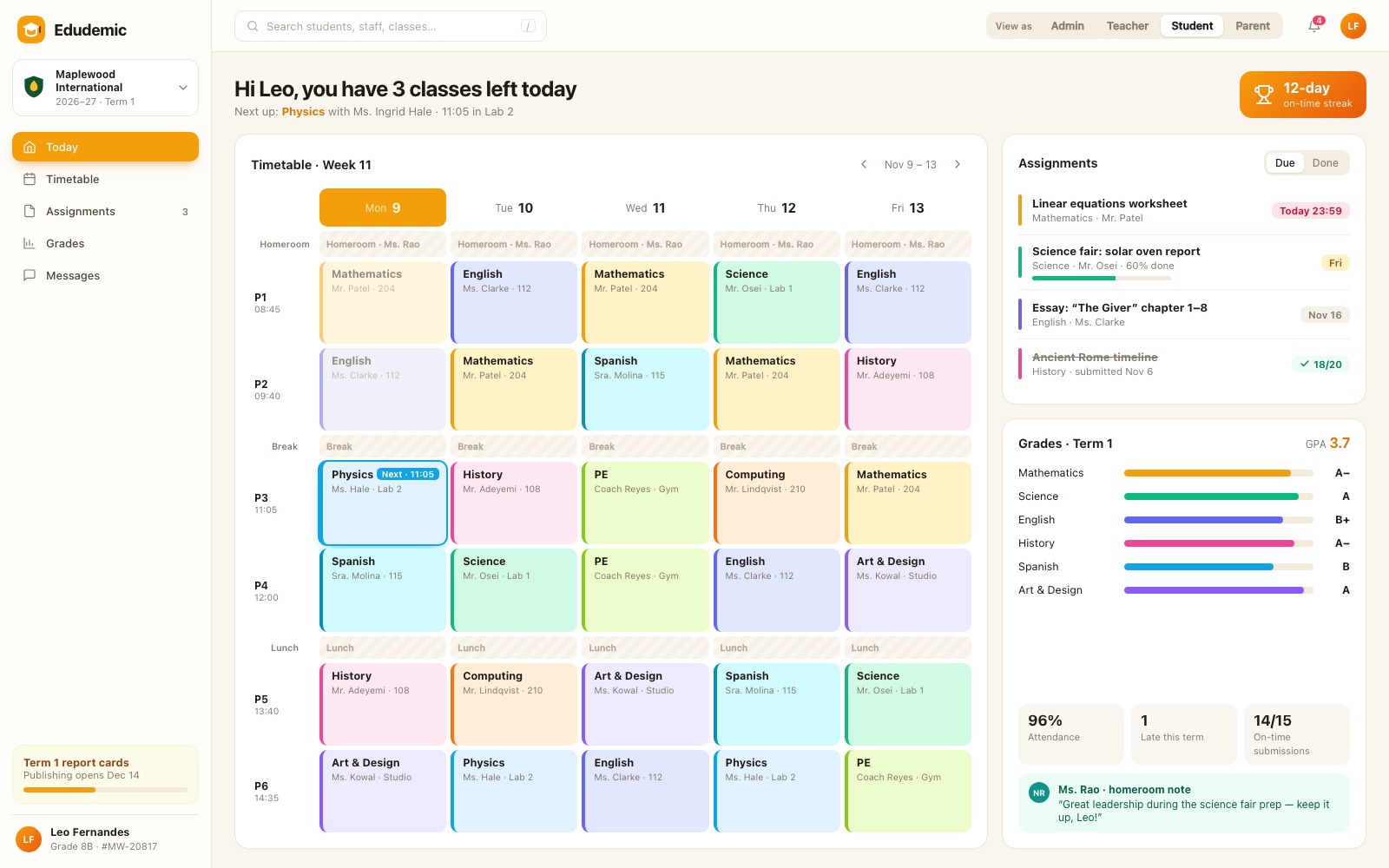
Students see their day at a glance: a weekly timetable showing what's next and where, a list of assignments with due dates and progress, and term grades by subject. Attendance, punctuality and on-time submission stats sit alongside notes from their homeroom teacher, giving students a clear picture of how they're doing.
Parent app and communication hub
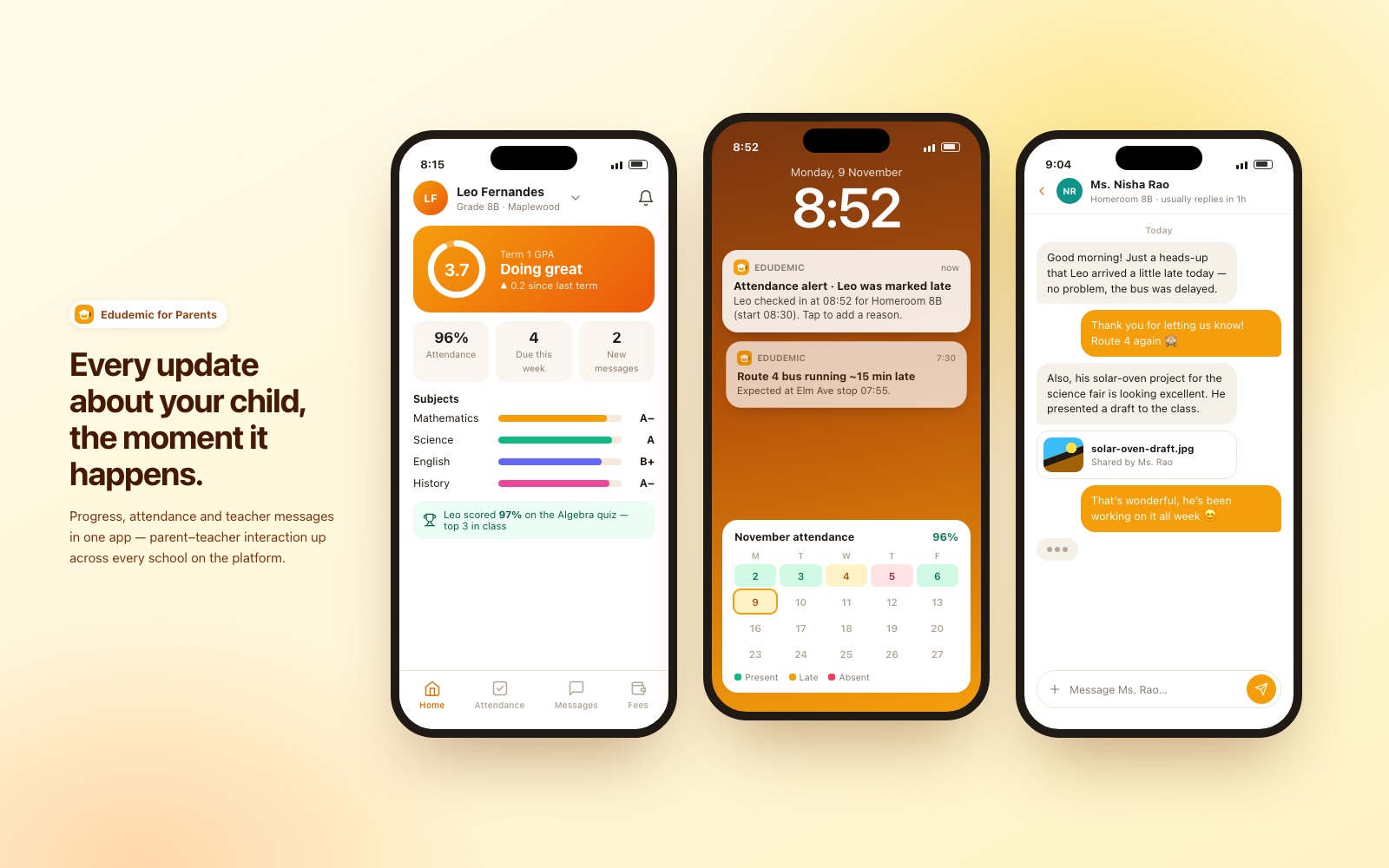
The parent experience is designed for mobile. Parents see their child's grades, attendance and upcoming work, and receive real-time notifications, such as an attendance alert the moment a child is marked late, or a school transport update. A direct messaging channel connects parents with teachers, making the parent-teacher conversation part of the normal week instead of a once-a-term meeting.
School settings (tenant configuration)
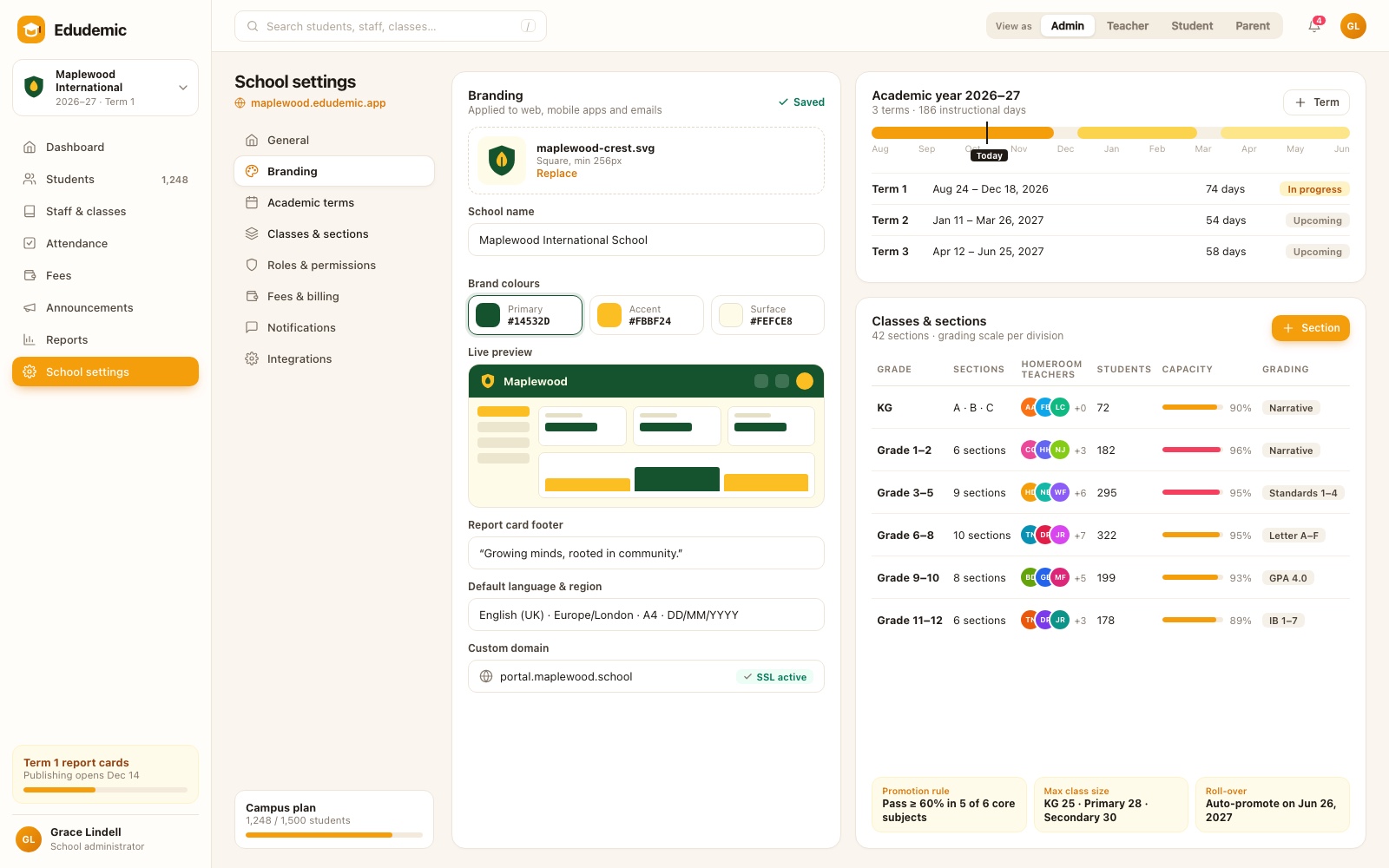
Each school configures its own environment. Administrators set branding (crest, colours and a live preview applied across web, mobile and email), the academic year and its terms, classes and sections with their grading scales, plus language, region and a custom domain. Rules such as promotion criteria and year-end roll-over are set per school, so the platform adapts to each institution rather than forcing one model on all of them.
Under the hood
- Multi-tenant role system. An authentication and authorization framework supports four roles (Admin, Teacher, Student, Parent), each with its own dashboard and permissions, scoped to the school they belong to.
- Administrative automation. Enrollment management, automated attendance tracking and grading tools take routine processing off school staff.
- Real-time notifications. The communication hub sends notifications and progress updates as they happen, keeping parents engaged with academic performance and school announcements.
- Scalable SaaS infrastructure. A multi-tenant architecture lets each school customize its environment while the platform provides high availability and centralized security updates for everyone.
Results
- 50% less administrative workload, through automated enrollment, attendance and grading.
- 4 tailored role dashboards, for Admin, Teacher, Student and Parent.
The change was also structural. Departments that used to work separately now share one source of truth, which improved data accuracy and institutional reporting. Direct digital channels increased parent-teacher interaction, giving students a more supportive environment, with home and school looking at the same picture of each child's progress.